
1995 Avalon Radio replacement step by step.
Although there are a couple of threads on TN about how to replace the Radio, I’d thought I’d document my own experience in case someone wants to do something similar.
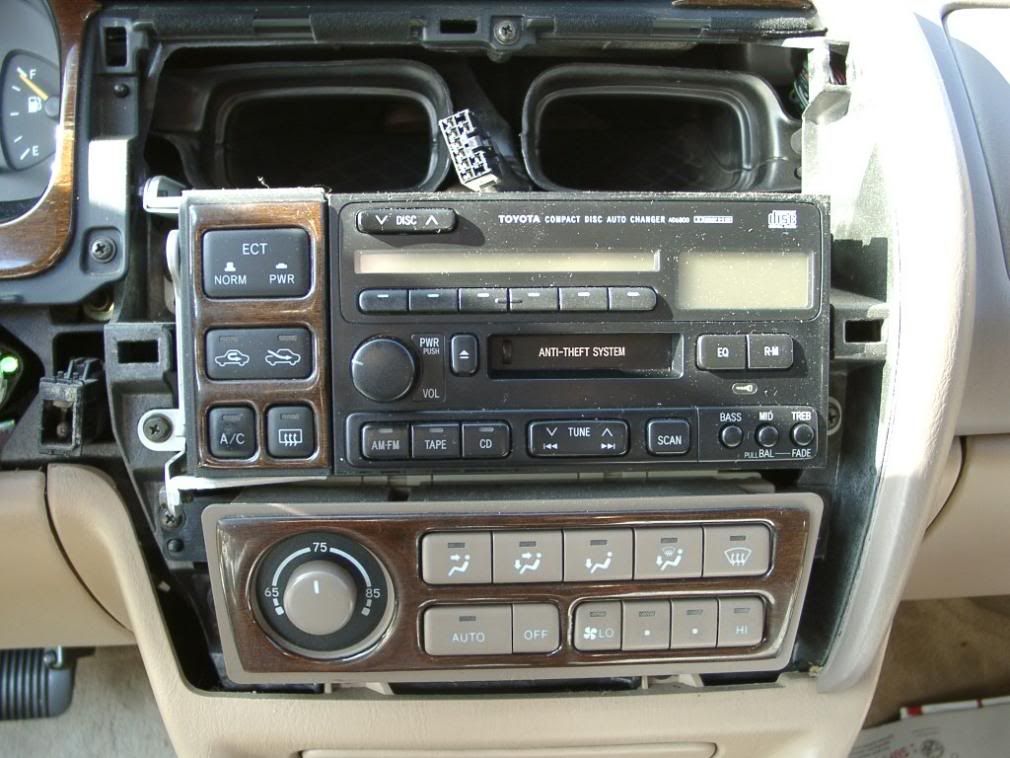
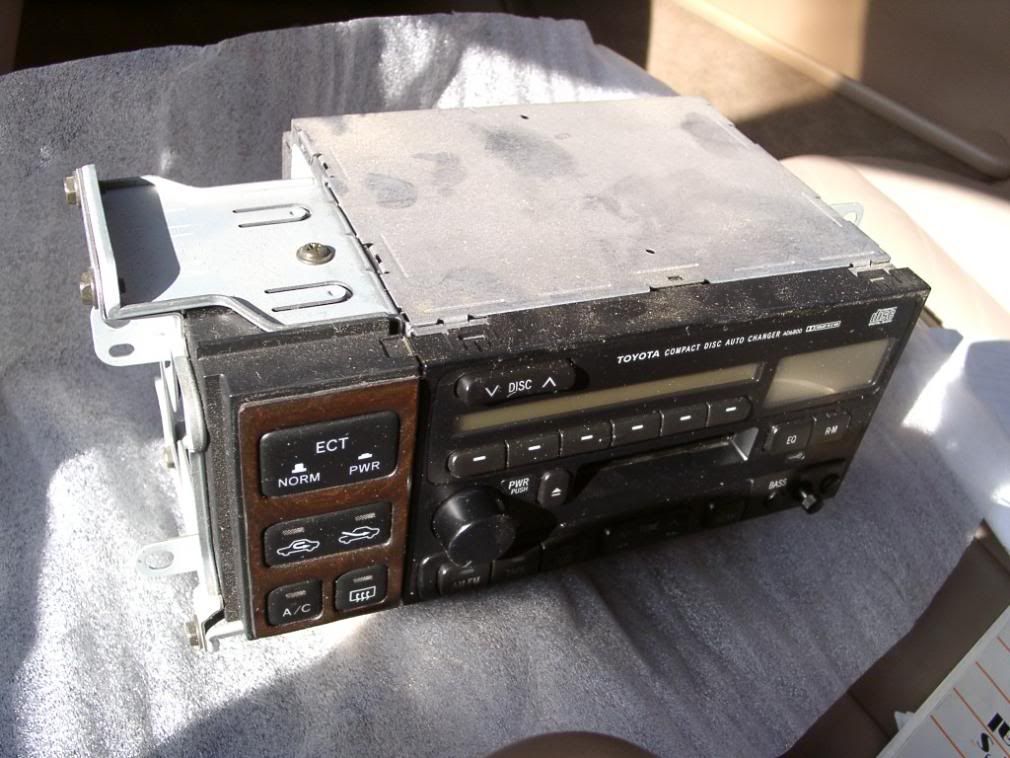
Car: 1995 Avalon XLS with the Factory Radio/Cassette/12 disc CD changer in the trunk (7 speaker system with factory amplifier and the stock subwoofer built into the hi mount brake light housing) Head unit seen here:
![Image]()
Replacement Radio: JVC KD-AVX1 am/fm tuner/cd/dvd/mp3/wma player with built in 3.5 screen on the faceplate and input for a satellite radio or other external a/v source (can also view .jpg files on a disc),
and
Clarion TX001 analog UHF/VHF tv tuner (I know its only good for about another year, but I had it lying around unused.)
The JVC is nice in that you can burn your mp3’s to a DVD and this unit will play them – 4.7GB worth. No need for an Ipod connection with one of these JVC units, really.
If you like the smooth face factory-look (which actually I do), then stop here, this install does not look factory or preserve the smooth look by the nature of the head unit itself, which sits proud so that the faceplate can swivel to load DVD's. In this case, substance has won out over style – the unit does everything I want it to, and I spend a LOT of time sitting in this car waiting for my son who plays competitive soccer – so having entertainment options is paramount.
The goal was to do an install that could be completely undone – that is an install with no permanent mods. This install can completely go back to factory in about an hour in case I decide to sell the car later or in case I want to move the unit to another car (this radio originally started life in my Mini)
![Image]()
![Image]()
![Image]()
![Image]()
![Image]()
Although there are a couple of threads on TN about how to replace the Radio, I’d thought I’d document my own experience in case someone wants to do something similar.
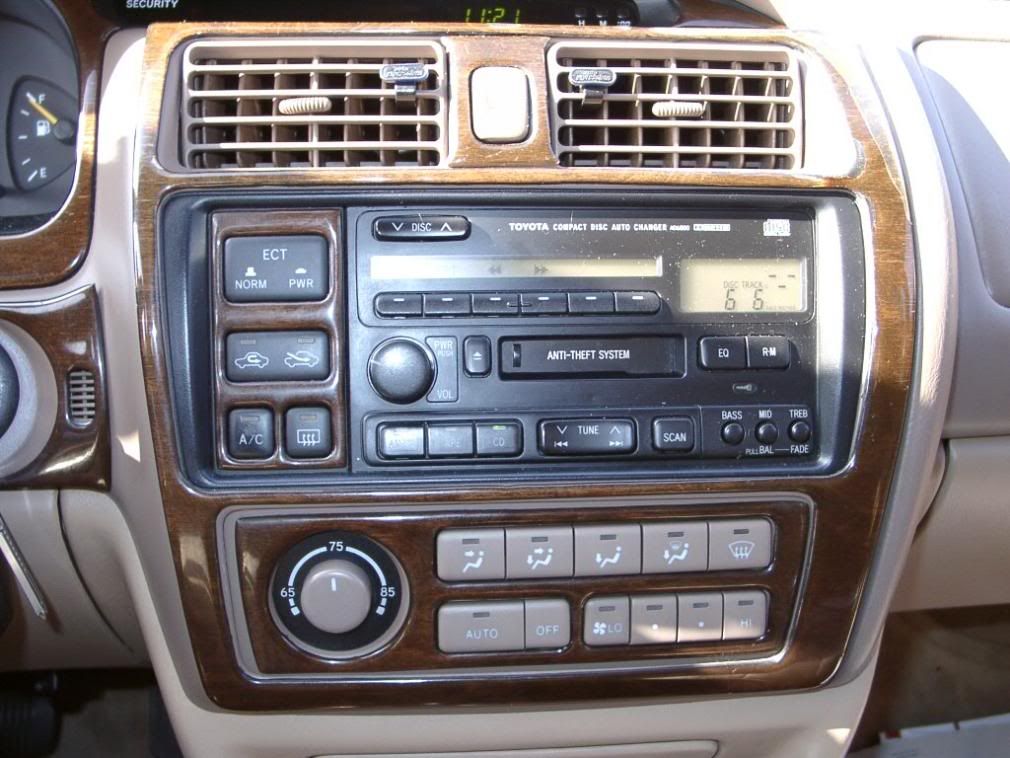
Car: 1995 Avalon XLS with the Factory Radio/Cassette/12 disc CD changer in the trunk (7 speaker system with factory amplifier and the stock subwoofer built into the hi mount brake light housing) Head unit seen here:
Replacement Radio: JVC KD-AVX1 am/fm tuner/cd/dvd/mp3/wma player with built in 3.5 screen on the faceplate and input for a satellite radio or other external a/v source (can also view .jpg files on a disc),
and
Clarion TX001 analog UHF/VHF tv tuner (I know its only good for about another year, but I had it lying around unused.)
The JVC is nice in that you can burn your mp3’s to a DVD and this unit will play them – 4.7GB worth. No need for an Ipod connection with one of these JVC units, really.
If you like the smooth face factory-look (which actually I do), then stop here, this install does not look factory or preserve the smooth look by the nature of the head unit itself, which sits proud so that the faceplate can swivel to load DVD's. In this case, substance has won out over style – the unit does everything I want it to, and I spend a LOT of time sitting in this car waiting for my son who plays competitive soccer – so having entertainment options is paramount.
The goal was to do an install that could be completely undone – that is an install with no permanent mods. This install can completely go back to factory in about an hour in case I decide to sell the car later or in case I want to move the unit to another car (this radio originally started life in my Mini)
- Make sure you copy down your radio security code prior to removing it. I wrote mine down on a piece of masking tape which I put on the back of the unit and on a slip of paper in the owner’s manual. Check your owner’s manual for the specifics on how to check or set the code, no need for me to reproduce that here.
- Remove any CD’s that are in the changer. Since the CD changer connection will be going unused in the future install, I wasn’t sure if any power would be going to it to operate the eject button.
- Remove your present radio. You can accomplish this easily by:
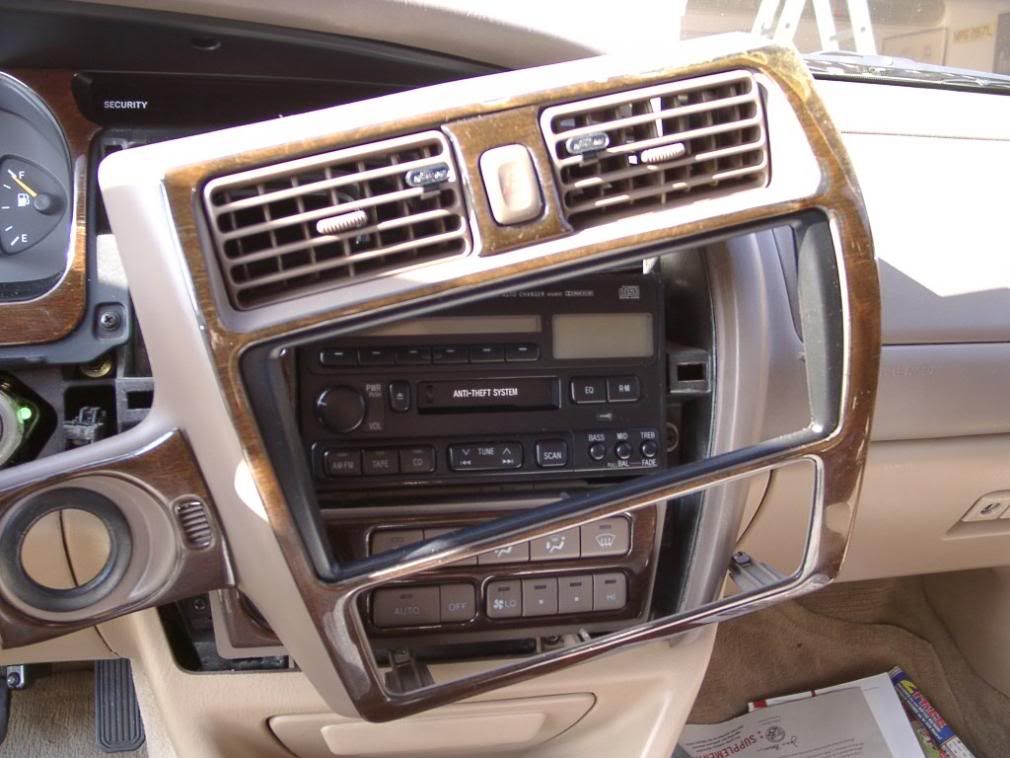
- Removing the trim face plate. Get something thin, flat, and wide (like a narrow paint scraper or putty knife) and wedge it underneath the lower edge of the trim plate just above the ash tray. Pull up to release the bottom, then get your fingers behind it and begin pulling out along the edges working your way towards the top. Note that this one piece panel extends to around the ignition switch too.
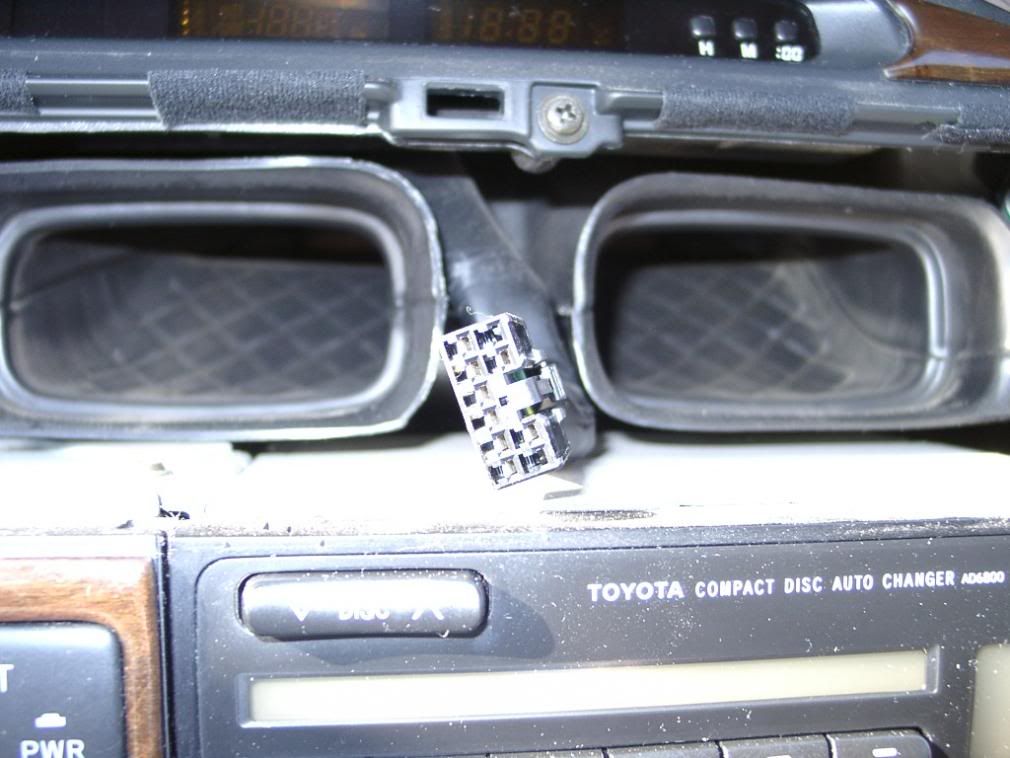
- Unplug the hazard switch from its connector on the back of the trim panel It is the black plug close up below. Also disconnect the small sensor near the ignition switch (for the auto climate control?). Set the trim panel aside.
- There are four screws that hold the radio and ECT /vent control switch module to the body. Undo them to lift out the entire unit. You will need then to unplug two white harness connectors on the back of the radio, two antenna connections (a large one and a small one) and a yellow plug to the back of the ECT/vent switch module.
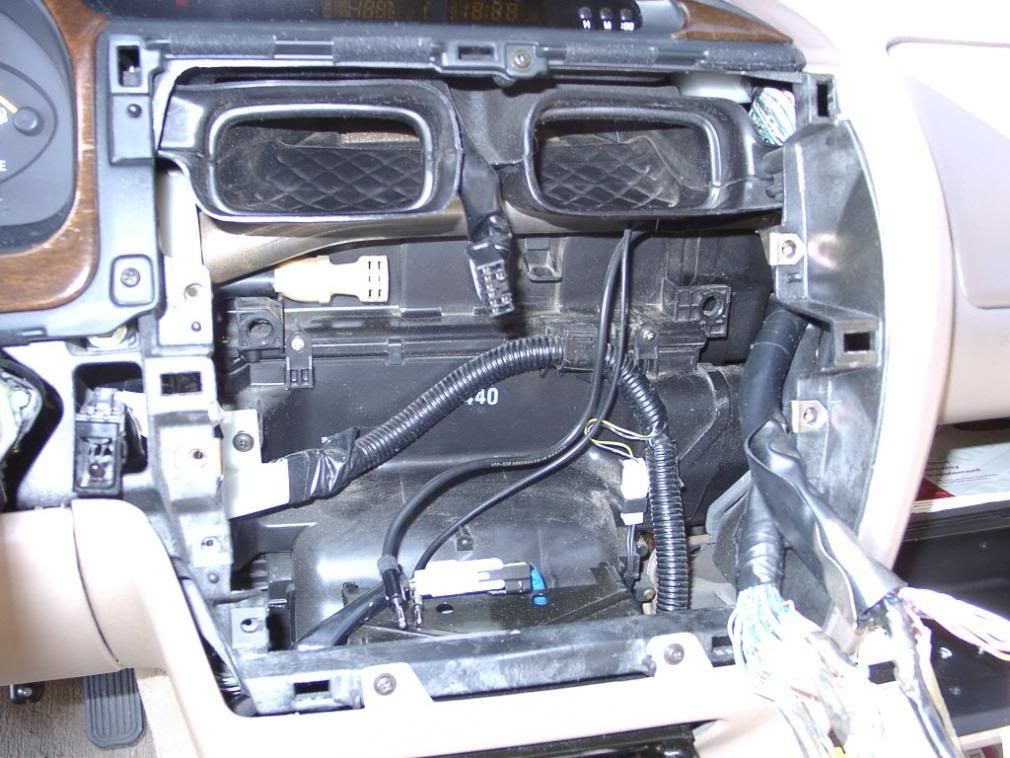
- Here we see the wires with the radio removed. There is a standard sized antenna connector, a small sized (AM band) antenna connector, and two radio harness connectors. The smaller white harness connector is for the trunk mounted CD changer, you will not need to use this one for your install.
![Image]()
- Since I was installing a separate TV tuner, I needed to also remove the auto climate control unit in order to have room for the tuner box. Unless you are doing something similar, you will not need to remove this. It is also held in with four screws.
![Image]()
- This is the Clarion external TV Tuner. Where to put it?
![Image]()
- There is plenty of room for it here, down near the glove box and footwell. If you didn’t mind running wires, there is also plenty of space in the center shift column to the right and forward of the shifter.
- Here we see the wires with the radio removed. There is a standard sized antenna connector, a small sized (AM band) antenna connector, and two radio harness connectors. The smaller white harness connector is for the trunk mounted CD changer, you will not need to use this one for your install.


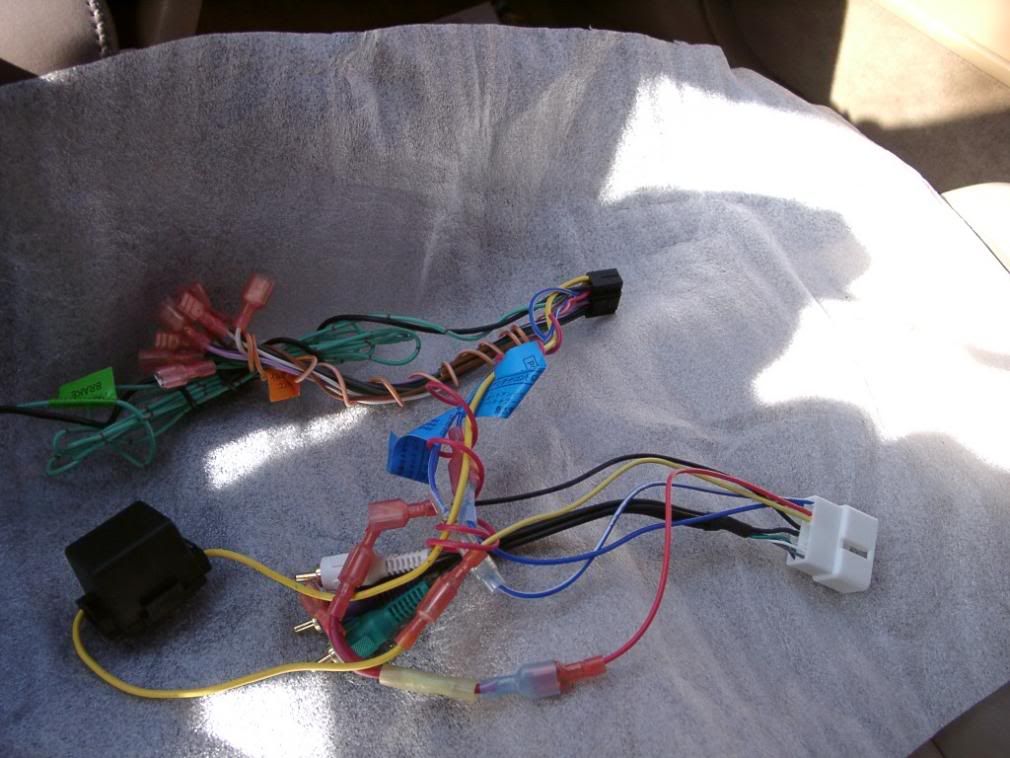
- This is the radio adaptor harness, all wired up to the aftermarket radio harness and ready to plug in. It has all the connections for power antenna, constant power, etc. This special harness is made for Toyota systems that have the powered amp built in. You will use the RCA connectors on the back of your radio to mate to this adaptor, the + and - direct speaker wires on your aftermarket radio harness are not used. It makes installation a snap. This was purchased through Crutchfield for about $12, it also pops up on E-bay. Note that this particluar harness is NOT the usual one that you see that is a two piece adapter - Those are made for Toyota systems that DO NOT have a factory built in amp. If you have a factory unit with no built in amp (most/all XL's?) then you would use the two piece adapter. This one is specifically made for units that have the factory amp built in.
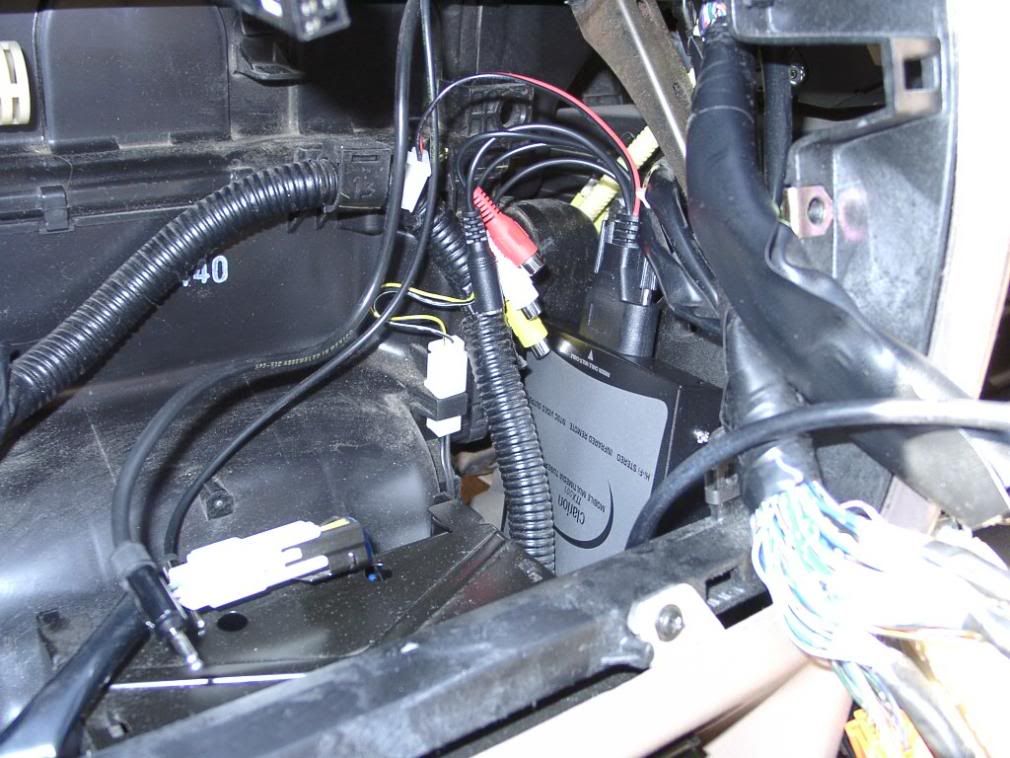
- Here is the adapter harness and the replacement radio harness plugged into the car’s body harness. On the right are the video and audio connections for the TV tuner to the back of the radio. The colored RCA connectors are from the adapter harness and will go to the back of the radio. The rest of the wires are all connected to the harness and will plug into the back of the radio using its harness plug.
![Image]()
- The TV tuner requires its own separate antenna, and is set up for a regular sized auto radio antenna plug connection. You could get a specialty auto TV diversity antenna, but that would be cumbersome and who wants an extra ugly antenna mounted somewhere? What to do? If only you could use the soon to be unused AM band antenna, which is a fine wire element built into the rear window by the defroster wire. But wait, you can! I bought a car antenna plug end adapter at radio shack for $1.50. The small AM band antenna plug end is small enough to just fit inside the full sized adapter plug housing. With a little bit of modification, the AM antenna plug can now be used for the TV tuner, which takes a regular full sized antenna plug. This can also go back to stock simply by removing the radio shack plug. Nothing cut, no permanent modifications.
![Image]()
- This is what the radio looks like removed and unplugged. Remember, write your security code on a piece of masking tape and put it on the radio so if you ever want to put it back in (or sell it off) you can.
![Image]()
- You must remove, and reuse, the brackets from your existing radio. There are four screws on the right side. You will reuse only two from each side, as the replacement pocket to go from double DIN to single DIN will come with its own screws.
![Image]()
- The left side bracket is trickier, because in order to remove it from the radio you must first remove the bracket holding the ECT/ vent switch module to get access to it. First remove the screw at the top:
![Image]()
- Then remove the screws at the side:
![Image]()
- Then you can swing the switch module out of the way to get access to the four screws that actually hold the bracket to the radio.
![Image]()
- You now can attach the brackets to your new radio. Test fit to make sure the radio is at the mounting depth that you want from the front panel.
![Image]()
- This shows the mounting for the new under radio pocket, which fits in the lower holes of the bracket. Depending on your brand of radio, you could mount this above the radio if you wanted. I thought about using a stock XLS pocket with the little flip down door, but this was not possible given my radio, where the whole faceplate moves and rotates to load DVD’s and CD’s and there is not much clearance. This aftermarket pocket came from Crutchfield also. It's a generic unit for Toyota installs.
![Image]()
- With the brackets all installed, the radio is test fit back into the slot and the harnesses all plugged in and routed around for clearance. Looks like we have power!
![Image]()
- Test of the TV tuner. Brings in channel 31 loud and clear (classic star trek re-run). Scotty, I need more power! Reception from the AM band antenna while stationary is nearly perfect with all channels.
![Image]()
- The radio bracket screwed back in with the four mounting screws, and the trim piece reinstalled after plugging in the hazard switch and auto temp sensor plug by the ignition lock. Make sure you plug the hazard switch back it - the turn signals route through that circuit.
- You will note that it is a big old faceplate, bigger than a single DIN opening. Because of the car's stock trim ring, the radio does not sit quite flush but stands a little more proud than I would like. The only way to fix this would be to pull the radio, take off the mounting brackets and elongate the bracket holes slightly to allow the radio unit to mount forward another 1/8 inch or so.
![Image]()
- Also, the car’s trim piece sits so close to the radio as mounted that there is absolutely no room for the trim surround bracket that came with the radio to be used, leaving a small gap on the driver’s side. Just going to have to live with it.
![Image]()
- Here is the adapter harness and the replacement radio harness plugged into the car’s body harness. On the right are the video and audio connections for the TV tuner to the back of the radio. The colored RCA connectors are from the adapter harness and will go to the back of the radio. The rest of the wires are all connected to the harness and will plug into the back of the radio using its harness plug.




 !
!